Hands On HotDropFPS PC!
june 6th 12pm pst
Think you have what it takes to keep your hand on the PC longer than everyone else?
Hands On HotDropFPS PC! is a live online digital endurance challenge beginning June 6 at 12:00 PM Pacific Time. Approved contestants will receive a private username and event key to enter the competition. Once the event begins, players must remain present and successfully complete randomized on-screen interaction checks to keep their virtual hand on the PC.
The competition continues until only one eligible contestant remains.
Prizes
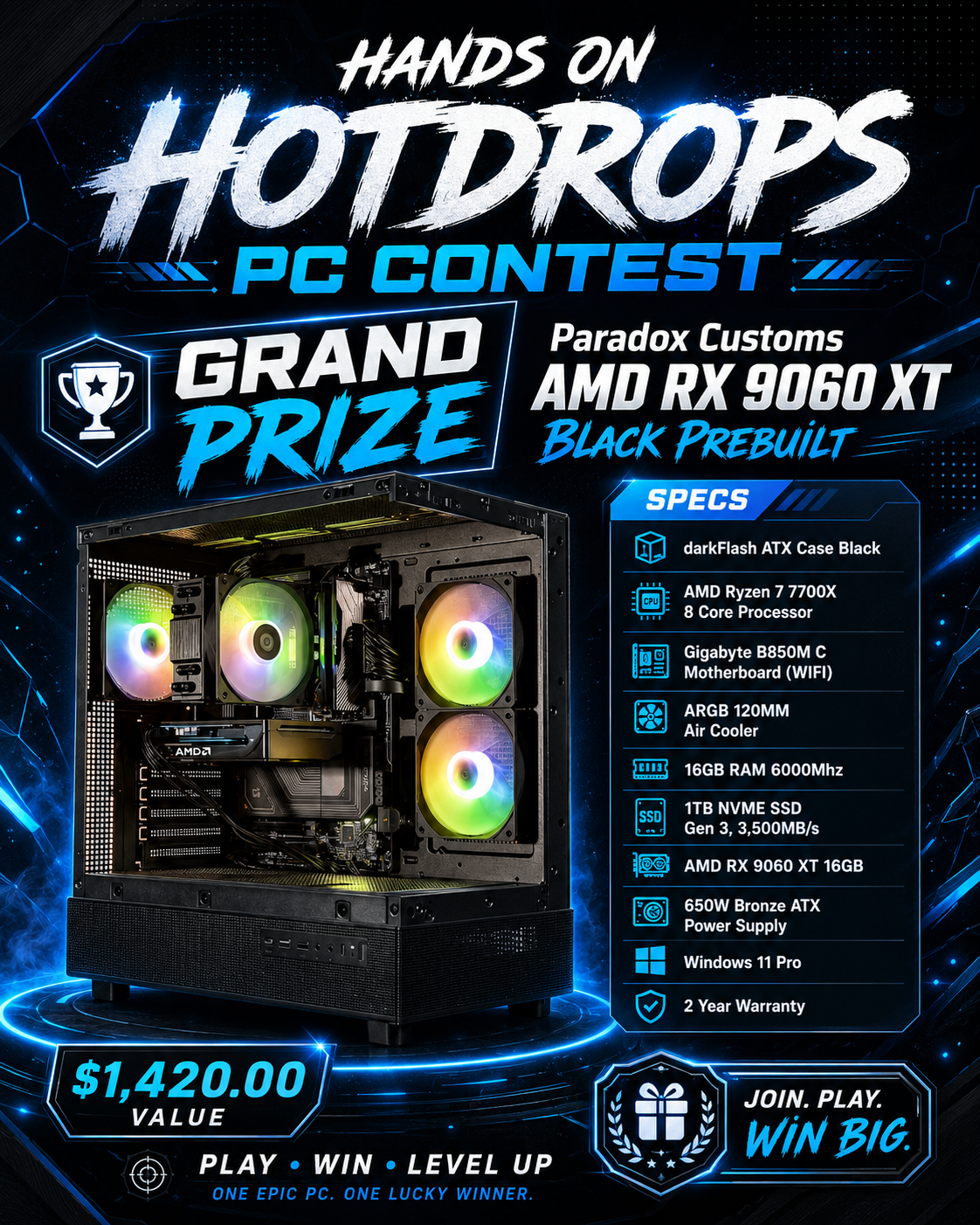
Grand Prize: A gaming PC provided by Paradox Customs and paid for by HotDropFPS. For a winner outside the United States, HotDropFPS reserves the right to substitute the prize with an equal-value gaming PC shipped from a distributor in the winner’s country, subject to availability and applicable law.
Runner-Up Prize: A $100 USD equivalent Amazon Gift Card provided through the appropriate Amazon marketplace available in the runner-up’s country.
Important Event Details
This is a fully online live event.
Contestants must be 18 years of age or older.
Entry is open worldwide except where prohibited by law or restricted by applicable trade, sanctions, shipping, or prize-delivery limitations.
No purchase is necessary to participate.
Each approved contestant receives one private event key tied to their approved username.
Only one contestant may check in from the same detected public network connection.
Once the starting roster is locked, no new or replacement contestants may enter the competition.
Healthy-play break options will be available during the event under the official rules.
The final winner is subject to eligibility and event-log verification.
Privacy and Promotion Notice
Names, email addresses, and other private information collected for this event will remain confidential, will not be used for marketing, and will not be sold to third parties.
By applying to participate, contestants understand that their submitted Twitch/Kick username and profile photo may be displayed during the live event and used in promotional content related to the event.
Apply for your chance to compete, keep your hand on the PC, and be the last player standing.
Participation is subject to the official event rules, eligibility verification, and available event capacity and technology requirements.
1. Before Event Day
Protect your username/key
- You will receive an approved Twitch/Kick username and a private one-time event key.
- Do not share, sell, transfer, post, screenshot, or stream your key.
- Your key can be claimed only once and becomes attached to the account that claims it first.
- Create or sign into the event platform before check-in opens so you are not rushed.
- Review the official rules and privacy notice before claiming your key.
2. Claiming Your Spot
Use your username and private key
- Open the contestant login page and sign in with your own account.
- Enter the exact approved username assigned to you.
- Enter your private key and complete the required rules/privacy acknowledgements.
- After a successful claim, your public event identity will be your approved Twitch/Kick username.
- If your key is lost before it is claimed, contact HotDropFPS before roster lock. Reissues are not guaranteed.
3. Check-In
One network per contestant at check-in
- You must check in before the roster is locked.
- Only one contestant may check in from the same detected public network connection.
- If another contestant has already checked in from your network, your check-in may be denied.
- After a successful check-in, you may change networks if your device needs to stay connected.
- If you do not claim and check in before roster lock, you will not enter the event and no replacement will be admitted after start.
4. During Gameplay
Respond to randomized checks
- Once the event starts, keep the contestant page open and watch the Presence Check area.
- Checks may ask you to click a button, type a phrase, answer a math prompt, or click a labeled PC component.
- Deadlines are controlled by the server. Refreshing, switching devices, or reconnecting does not add extra time.
- Missing or failing checks outside approved protection follows the event lifeline/elimination rules.
- No new or replacement contestants can enter once the roster is locked.
5. Healthy Play Breaks
Use protected breaks responsibly
- Emergency Break: 15 minutes of protected missed-check exemption, available once every 8 hours.
- Long Break: 4 hours of protected missed-check exemption, available once every 24 hours.
- Break timers are server-controlled and cannot be reset or extended by the browser.
- Breaks cannot be started after seeing an incoming or active interaction check.
- The page will show when your active break ends and when each break becomes available again.
6. Switching Devices
Move from PC to phone safely
- You may sign in on another device using the same contestant account.
- Choose Continue Event On This Device to move control to the new device.
- Your previous device becomes view-only and cannot submit checks or request breaks.
- Device switching does not pause the event, reset timers, restore missed checks, or change your lifelines.
- Use only one active device for gameplay. Sharing account access or using multiple people to operate one contestant is prohibited.
7. Fair Play
One person, one account, one key
- No bots, automation, scripts, macros, remote operators, account sharing, or outside assistance.
- Do not attempt to manipulate timing, network checks, device sessions, browser requests, or event data.
- HotDropFPS may review logs, incidents, security records, and eligibility before confirming final results.
- The final result is winner-pending until host verification is completed.
8. Privacy Reminder
Public vs private information
- Your Twitch/Kick username and submitted profile photo may appear during the live event and event promotion.
- Your name, email, private key, network/security data, and private audit details are not shown publicly.
- Read the privacy notice for more information before participating.